Trinity JCS (Job Control System) automates and simplifies complex job scheduling at scale. By centralizing job and workload management, it gives you real-time visibility into execution status, accessible securely from anywhere on the network.
Trinity JCS works across multiple operating systems and hybrid enterprise architectures, making it simple for you to deploy in both on-premises and cloud environments.
Centralized Control
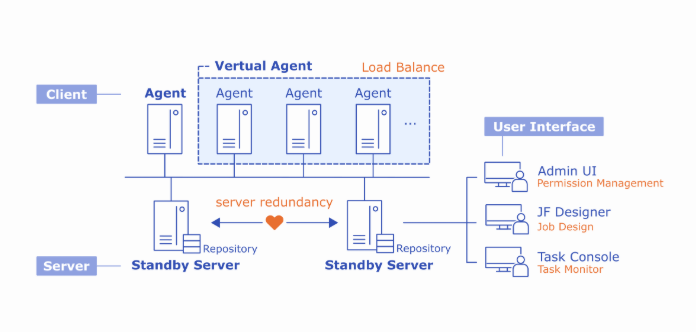
With Trinity JCS’s controller–worker architecture, you can manage jobs across distributed hosts from a central server while keeping execution logs under centralized control, making your maintenance easier and more efficient.
Scalable Performance
Using a license-based model built for high scalability, Trinity JCS enables you to boost performance as your workloads grow by simply adding more execution nodes without disrupting operations.
• Duplicate or link jobs for rapid deployment.
• Export and import jobs in bulk to set up new development environments quickly.
• Enable or disable job schedules with a single click.
• Maintain control with built-in versioning and rollback support.
• Keep systems optimized with automated housekeeping to remove outdated logs.
Schedule and Execute with Flexibility
• Create multiple calendars and time-based schedules.
• Control workflow sequences, job dependencies, and conditional triggers with precision.
• Automate file-based job triggers using FTP directory monitoring.
• Apply shared scheduling rules to manage entire job groups in bulk.
Expand Job Execution Capabilities
• Integrate batch jobs across multiple hosts.
• Trigger job execution via commands, scripts, applications, enterprise tools, APIs, web services (SOAP, REST), or big data platforms.
Automate File Reception
• Validate incoming files for count, size, and integrity.
• Monitor local files and support FTP/SFTP file transfers.
Monitor in One Unified Interface
• Access visual dashboards with graphical, hierarchical, filtered, and dependency views.
• Track real-time status updates and job progress.
• Review detailed execution logs for faster troubleshooting.
Control Access with Confidence
• Integrate with enterprise Active Directory, LDAP, and CAS SSO.
• Apply granular permissions by user, role, and object.
Manage Batch Jobs Efficiently
• Execute large batches across multiple job levels.
• Filter and manage batches for delete, stop, pause, or rerun operations.
• Run dependent jobs individually or in sequence.
• Temporarily disable job dependencies.
Adjust execution priorities on demand.
Handle Errors and Alerts Proactively
• Configure retry logic with customizable limits and intervals.
• Receive automated alerts via email, SMS, API, or third-party enterprise applications.
Stable. Scalable.
Future-Ready.
Backed by years of industry experience, Trinity has advanced through versions 3, 4 and now Trinity 5, with each evolution focused on solving real-world customer challenges. Trinity 5 is the next-generation automated data integration platform, engineered to deliver technical innovation while addressing industry-specific needs with precision.
Uninterrupted Service
High Availability & System Stability
• Maintain uninterrupted job dispatch with Active–Standby server redundancy. • Improve stability through optimized resource management and client-side load balancing. • Safeguard service delivery with mutual failover protection across client nodes.
Extended Applications
Extended Applications
Enterprise IT Scheduling Automation
Optimize IT workflows to meet SLA commitments with robust job scheduling capabilities that ensure system-wide visibility and performance.
Ready to take the next step in your data journey? Whether you want to explore a demo, request a proof of concept, or speak directly with our experts, Trinity makes it simple to get started. Our team will work for yo to understand your needs, design the right solution, and help you accelerate value from day one-securely, compliantly, and at scale.